
When a Job Tracking Spreadsheet Stops Working — and What to Use Instead
A spreadsheet feels like the responsible choice when you start a job search. It's free, it's flexible, and it gives you a sense of control over a process that mostly feels out of your hands. So you build columns: company, role, date applied, status, notes. For the first ten applications, it works beautifully.
Then it quietly stops working — and you usually don't notice until it's already cost you.
The signs your tracker has stopped tracking
Spreadsheets don't fail loudly. They degrade. A few patterns to watch for:
- You're updating it less than you're applying. Rows get added in batches days later, from memory, with dates you're guessing at.
- The status column lies. "Applied" is doing too much work — it's covering roles you applied to, roles you meant to apply to, and roles you started and abandoned halfway through a form.
- You can't remember which resume you sent. The tailored version lives in a downloads folder called
resume_final_v3_ACME.docx, and the spreadsheet has no idea it exists. - You've stopped opening it before applying. The tracker has become a record of the past instead of a tool for the next application.
None of these are discipline problems. They're the predictable result of asking a manual document to keep up with a high-volume, fast-moving process.
Why the spreadsheet breaks under volume
The core problem is that a spreadsheet only knows what you type into it — and typing is the slow part.
Every application involves the same repetitive work: entering your name, phone, work history, and education into yet another form; rewriting your resume to match the job description; writing a cover letter that references the role; then logging it all somewhere so you don't lose track. A spreadsheet can only help with that last step, and only if you remember to do it.
Worse, it can't help with the step that actually matters most: tailoring. If you're applying to a handful of roles, you can customize each resume by hand. If you're applying to dozens — which is what the numbers usually require — hand-tailoring every document is the first thing to go. So either your volume drops, or your tailoring does. A spreadsheet can't fix that trade-off, because it isn't part of the application at all. It sits off to the side, waiting to be updated.
What to use instead
The fix isn't a better spreadsheet template. It's collapsing the gap between applying and tracking, so recording an application is a side effect of sending it rather than a second job.
That's the approach Amploy takes. It's a Chrome extension plus a website built for exactly this: applying to more roles, faster, without the busywork piling up. Here's how it maps onto the problems above.
Tracking that updates itself as you apply
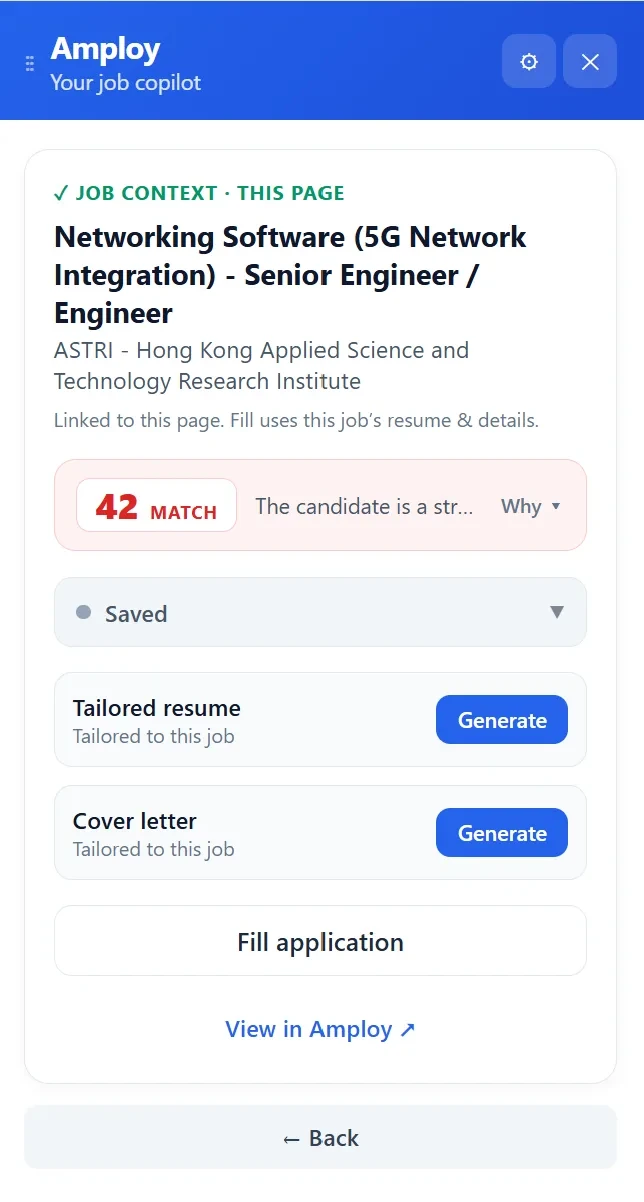
Amploy's job tracker puts every application into a status pipeline — Saved → Applied → Interview → Offer — and keeps it next to the tailored resume and cover letter you sent for that specific role. No row to remember to add, and no guessing which document went where. When you open the tracker, it reflects what you actually did, not what you meant to log.

Tailoring that doesn't get skipped
Because volume and tailoring usually pull against each other, Amploy handles the tailoring for you. The resume rewrite takes your real experience and reframes it to match each job description. The cover letter generator drafts a first version that references the role and your actual background — editable, so it still sounds like you.

Both documents stay attached to the role in your tracker, which is the part a spreadsheet fundamentally can't do: keep the application and its paperwork together.
Forms filled in a click
Autofill fills name, phone, work history, and application essays from your profile, so the repetitive part of each application takes a click instead of ten minutes of copy-paste. That's the time you were previously spending on the form — and then again on the spreadsheet.
One less thing to remember
Career sites mean logins, and logins mean password resets in the middle of an application. Amploy's password saver keeps one saved login per career site, so you're not locked out of your own job search.
When to switch
You don't need to abandon your spreadsheet the moment it feels annoying. But if any of these sound familiar, it's probably costing you more than it's saving:
- You're applying to more than a handful of roles at a time.
- You've lost track of which resume version went to which company.
- You've skipped tailoring to keep up with volume — or cut volume to keep tailoring.
- You spend more time maintaining the tracker than you'd spend just applying.
The point of tracking your applications was never the tracking itself. It was landing interviews. A tool is worth keeping only if it moves you toward that — and a spreadsheet that eats your time and hides your paperwork isn't doing that anymore.
Amploy is built on a simple premise: hiring is broken, volume wins, and most rejections aren't personal — the people who land interviews just apply more, faster. If your spreadsheet is the thing standing between you and that speed, it's time to replace it.