
Tracking Jobs by Stage: Saved, Applied, Interview, Offer
Applying to jobs is only half the work. The other half — the part nobody warns you about — is keeping track of what you sent, where you sent it, and what happened next. A spreadsheet can do it. Your inbox can sort of do it. But once you're applying at any real volume, "sort of" becomes a problem.
That's the gap a stage-based tracker fills. Not a list of jobs, but a pipeline that shows exactly where every application stands.
Why stages beat one long list
A flat list of applications flattens everything into a single question: did I apply? That question stops being useful almost immediately. What you actually need to know is:
- Which roles have I saved but not applied to yet?
- Which applications are live and waiting on a reply?
- Which ones have moved to interview?
- Where do I stand at offer stage?
Each of those questions leads to a different next action. Saved roles need attention. Applied roles need patience or a follow-up. Interviews need prep. Offers need a decision. When everything lives in one undifferentiated list, all four get the same treatment — which is to say, none.
The four stages
Here's a simple structure that covers most job searches without becoming a second job to maintain.
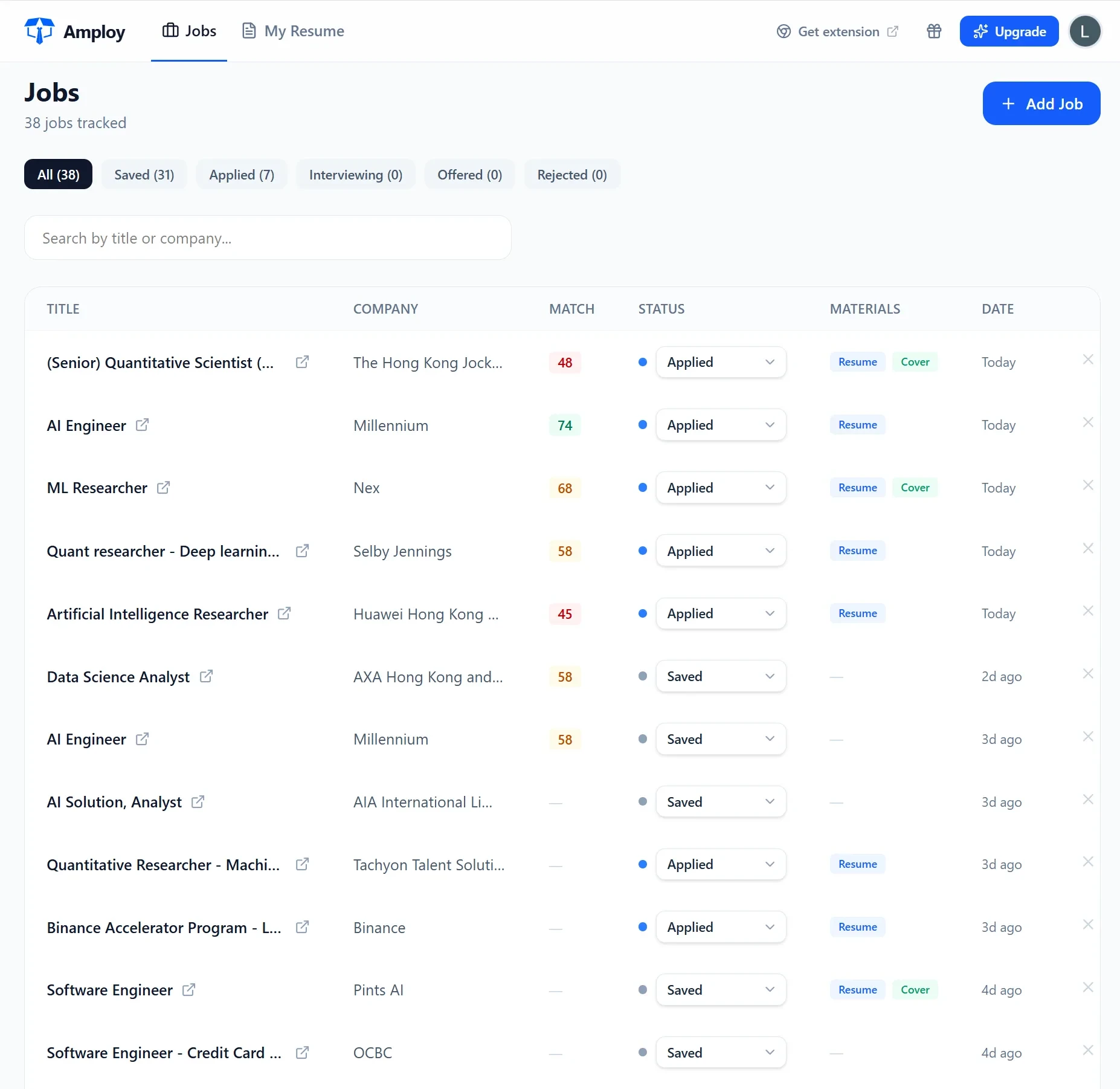
Saved. Roles you've found and want to apply to. This is your queue. The goal is to keep it short and moving — saved jobs that never leave this stage are just clutter with a bookmark.
Applied. Everything you've submitted. This is the number that matters most for the "volume wins" approach: the more real, tailored applications you send, the higher your odds of interviews. Keeping this stage accurate means you always know your true active count.
Interview. Any next step beyond the application — phone screens, take-homes, panel loops. This is where prep lives.
Offer. The endgame. Even if it's a single entry, it deserves its own stage.
What should sit next to each stage entry
A stage is only as useful as the context attached to it. At minimum, each entry should know:
- The role and company you applied to
- The resume and cover letter version you sent
- The date you applied
- The current status — the stage itself
That third item is the one people forget, and it hurts later. If a role required a tailored resume rewriting your experience around a specific job description, you want to be able to open that exact version when a recruiter calls. Same for the cover letter — if it was generated as a first draft and edited into your voice, the final version is the one you actually sent.
Build the habit before you build the system
The best tracker is the one you'll actually update. That usually means tracking during the application, not after — the moment you hit submit is the moment the entry should land in your pipeline. Do it after the fact and you'll skip it on busy days, and the pipeline quietly stops being true.
That's why having the tracker inside the same tool you apply with changes the behavior. When the status pipeline sits right next to each tailored resume and cover letter, updating a stage is one click, not a separate chore in another tab.
How this works in Amploy
Amploy is built around the assumption that volume wins — and that the way to apply at volume without burning out is to remove the busywork around every application, not just the form-filling.
Here's how the pieces fit a stage-based pipeline:
- Autofill handles the repetitive fields — name, phone, work history, essays — so moving a saved role to applied takes seconds.
- Resume rewrite tailors your real experience to each job description, so each applied entry has a version worth tracking.
- Cover letter generates a first draft referencing the role and your actual experience, editable for your voice.
- Job tracker holds the pipeline itself — Saved → Applied → Interview → Offer — with the tailored resume and letter attached to each entry.
- Password saver stores one login per career site (not per job), so you're never locked out of a portal when you need to check a status.
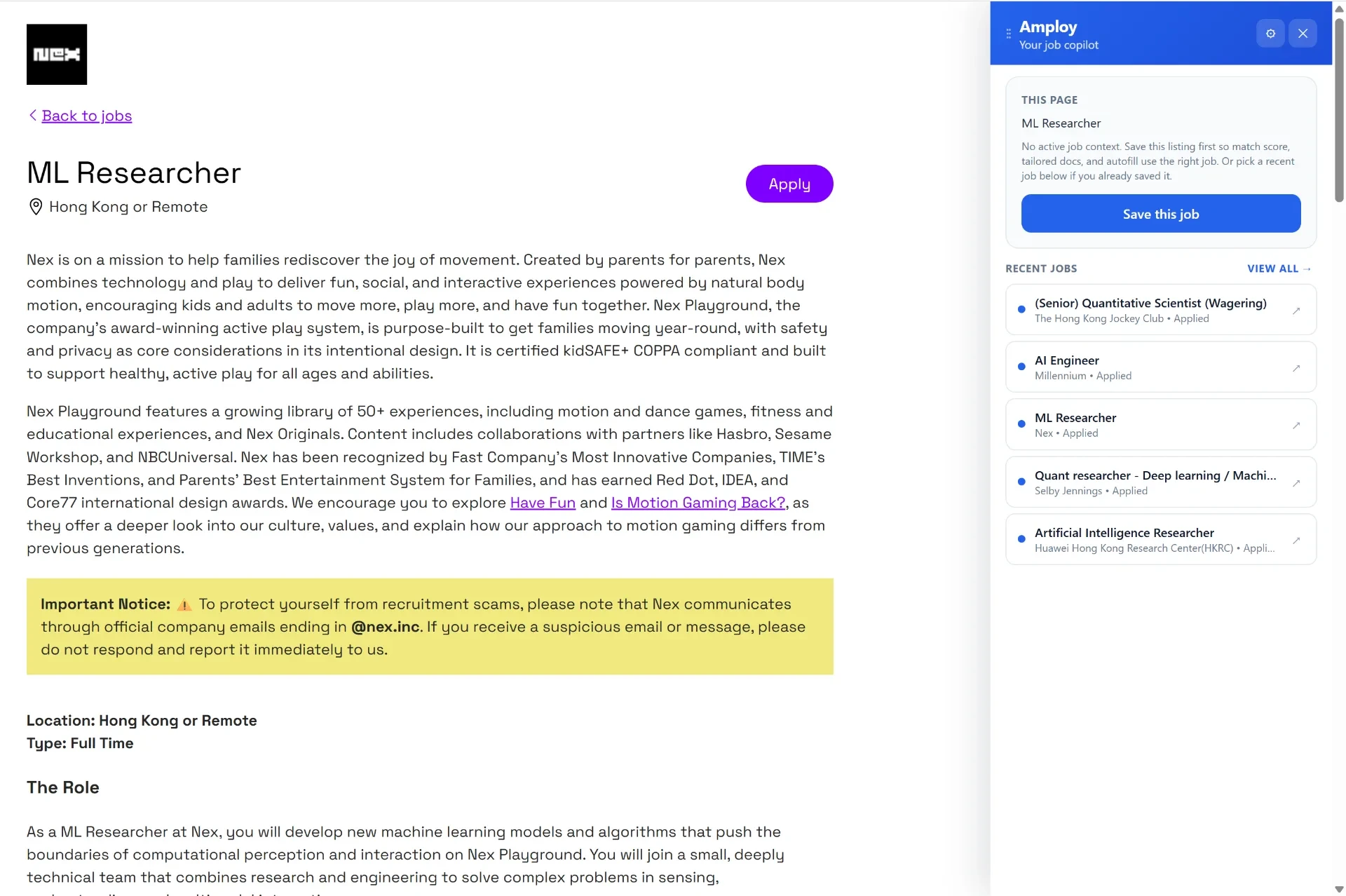
The point of the pipeline isn't record-keeping for its own sake. It's that knowing exactly where every application stands is what lets you keep applying — to the next saved role, the one after that — without losing track of the interviews you've already earned.
Start with your next application
You don't need to migrate an old spreadsheet to get value from stages. Start with the next role you apply to: save it, apply, move it to applied, and attach what you sent. Do that a few times and the shape of your search becomes visible — how many are live, where the bottlenecks are, what needs a follow-up.
Tracking jobs by stage turns a pile of applications into a process. And a process is something you can actually run at volume.