
The Best Way to Choose Between Job Tracker Apps and Simple Spreadsheets
So you're applying to jobs again. You've got a folder of half-finished resumes, a browser with nineteen tabs open, and a decision sitting in front of you: do you track all this in a spreadsheet you build yourself, or do you hand it over to a dedicated job tracker app?
It sounds like a small question. It isn't. The tool you pick decides how much time you spend on admin versus how much you spend actually applying — and when the name of the game is volume, that difference compounds fast. Let's break down the real trade-offs, then look at where a purpose-built tracker fits into an Amploy workflow.
First, what are you actually trying to solve?
A job tracker has one job: tell you, at a glance, where every application stands. But "where it stands" means two different things depending on who you ask.
- Pipeline tracking — what did I apply to, when, and what's the status? (Saved → Applied → Interview → Offer.)
- Application assets — which resume version did I send, and which cover letter went with it?
A spreadsheet can technically do both. The question is how much manual upkeep that takes, and what happens when you're sending out ten applications a week instead of two.
The case for a plain spreadsheet
There's a reason spreadsheets are the default. They're free, they're flexible, and you already know how to use them.
- Zero learning curve. Open a sheet, add columns, done.
- Total customization. Want a column for "recruiter's name" or "follow-up date"? Add it.
- Own your data. It lives wherever you keep it, in a format you control.
- No subscription. For the occasional applicant, that matters.
If you're applying to three roles a month and tracking them on paper would work fine, a spreadsheet probably isn't your bottleneck. Keep it.
But volume changes the math. The more applications you send, the more rows you maintain — and the more time a spreadsheet quietly eats every week.
Where spreadsheets start to break
The friction isn't dramatic. It's death by a thousand small tasks:
- Manual entry, every time. You finish an application, then re-type the company, role, date, and status into your sheet.
- Asset chaos. You rename a resume "final_v3_tailored.docx" and a week later can't remember whether it went to company A or company B.
- Status drift. You get a reply, you tell yourself you'll update the tracker later, and you don't. Now the sheet is lying to you.
- No connection to the work itself. Your sheet knows you applied — but not which tailored resume or letter actually went out.
None of these are fatal on their own. Together, they're why so many trackers go stale after the first month.
What a job tracker app does differently
A dedicated app earns its place by removing the manual steps, not just giving you a prettier grid.
The useful distinction to look for: does the app live where the application happens, or somewhere you have to remember to visit? A tracker that sits beside the form — capturing the role as you apply — beats a separate tab you have to feed by hand. That's the design principle behind Amploy's job tracker: the status pipeline sits right next to each tailored resume and cover letter, so the application and the record of it are the same action.

The practical differences that matter most:
- Auto-capture over manual entry. If you don't have to type the row, you'll actually keep the row current.
- Assets attached to outcomes. Each application carries the resume and letter you used, so you can look back and see what worked.
- A pipeline you can trust. Status moves forward (Saved → Applied → Interview → Offer) as part of your normal workflow, not as an extra chore.
- One place, not five. When tailoring, applying, and tracking share a home, nothing falls through the cracks.
The honest comparison
| | Spreadsheet | Dedicated job tracker app | |---|---|---| | Cost | Free | Varies | | Setup | Minutes | Minutes | | Manual data entry | Required | Reduced or automated | | Linked to resume/cover letter | No | Yes, in a integrated tool | | Stays current at high volume | Hard | Easier | | Customization | Unlimited | Bounded by the product |
The spreadsheet wins on cost and flexibility. The app wins on staying current — and staying current is the whole point of a tracker.
How this fits into an Amploy workflow
Here's the thing: the tracker argument gets much simpler once you're already using a tool for the rest of the application. If you're filling out forms by hand and tailoring resumes in a word processor, a spreadsheet is a reasonable add-on. But Amploy handles the repetitive parts of applying and keeps the pipeline:
- Autofill fills the form from your profile in one click.
- Resume rewrite tailors your real experience to each job description.
- Cover letter drafts a first version referencing the role and your actual background — yours to edit.
- Job tracker records the application and its tailored assets together, with a status pipeline beside them.
- Password saver keeps one login per career site, so you're never locked out of an account you've applied through.
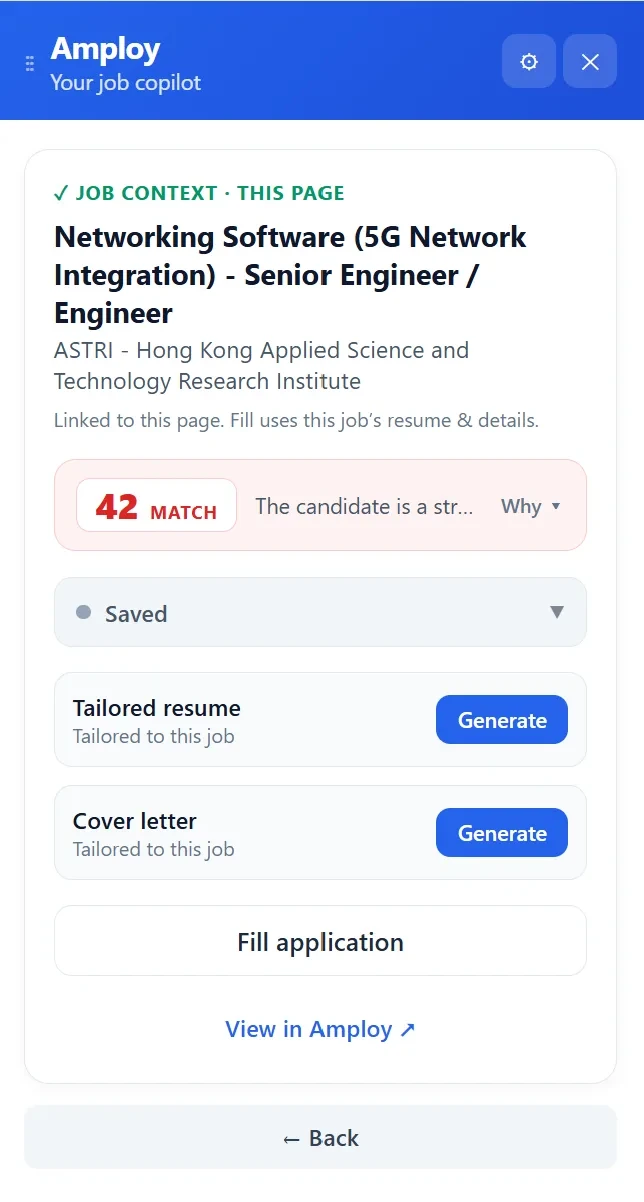
That's the argument in one line: the tracker is most useful when it's already sitting next to the application form. Otherwise you're copying your own work into a second system — which is exactly the busywork Amploy exists to remove.
How to decide (quick checklist)
Ask yourself:
- How many roles are you applying to per month? A handful? Keep your spreadsheet. Dozens? Manual tracking will slip.
- Have you lost track of which resume or letter you sent where? If yes, you need assets attached to applications.
- Is your tracker still accurate after two weeks? If not, the maintenance cost is beating the value.
- Do you want one place for tailoring, applying, and tracking? If so, a suite like Amploy saves the copy-paste between tools.
There's no wrong answer in the abstract. The right answer is whichever keeps your pipeline accurate without becoming another job. For most people applying at any real volume, that's an app that lives where the work happens.
The takeaway
Spreadsheets are a fine start. They're free, flexible, and familiar. But they only work while you're willing to keep feeding them — and job hunting is already the busywork.
Amploy's promise is simple: stop wasting so much time applying to jobs. The tracker, the tailoring, the autofill, and the saved logins all serve that one goal — playing the numbers game without burning out on the admin around it. If your spreadsheet has started to feel like a second job, it might be time to let the app handle the record-keeping while you handle the applications.