
Tailor Resume to Each Job: A Practical, Repeatable Process
Most job seekers don't get rejected because they're unqualified. They get rejected because their resume doesn't visibly match what the job description is asking for. The fix is simple to say and tedious to do: tailor your resume to each job. The problem is that "tailoring" sounds like a 45-minute rewrite every time you apply — which is why almost nobody does it consistently.
This is a repeatable process you can run in minutes per role, not hours.
First, get clear on what tailoring actually means
Tailoring is not rewriting your career. It's re-emphasizing the parts of your real experience that a specific job description cares about most. That usually means:
- Reordering or rewording your bullet points so the most relevant work is visible first
- Using the language of the job posting for skills you genuinely have
- Trimming details that are true but irrelevant to this role
- Reflecting the job's priorities in your summary line
You're not inventing anything. You're presenting the same experience through the lens of a particular job. Hiring is a volume game — most roles draw hundreds of applicants — and the candidates who get interviews are usually the ones whose resumes make the match obvious at a glance.
The repeatable process
Step 1: Pull the signals from the job description
Before touching your resume, read the posting twice — once for the role, once for the keywords. Highlight:
- The job title and any seniority language
- Repeated skills or tools (if it appears three times, it matters)
- The first three responsibilities listed (usually the core of the role)
- Any "must have" versus "nice to have" split
This becomes your checklist. You're looking for the overlap between what they want and what you've actually done.
Step 2: Reorder around the overlap
Go through your existing bullets and flag the ones that match your checklist. Those move up. The rest can stay, but they don't need to lead. A recruiter skimming your resume should hit your most relevant work in the first few lines of each section.
Keep the truthful phrasing. Don't rename your job title or inflate a skill — just surface what's already true.
Step 3: Mirror the language where it's honest
If the posting says "stakeholder management" and you've written "worked with cross-functional teams," and both are accurate, use their phrasing. Many companies screen resumes for keyword matches before a human reads them, so matching vocabulary helps you clear that filter without stretching the truth.
Step 4: Adjust your summary line
Your professional summary should read like a one-sentence answer to "why this candidate for this role." It's the fastest place to signal a match, and it's the first thing most reviewers read.
Step 5: Repeat for the next role — and keep the versions straight
Here's where the process usually falls apart. After you've tailored five versions of your resume, it gets hard to remember which one you sent where, and easy to attach the wrong file to the wrong application. Always keep each tailored resume paired with the role it was built for.
Where this gets time-consuming — and how to compress it
The steps above are straightforward. Doing them by hand for every application, though, is exactly the busywork that makes people give up and send the same generic resume everywhere.
This is where Amploy is built to help. Instead of starting each tailoring pass from a blank page, you can generate a tailored resume that rewrites your real experience to match a specific job description, then edit the draft so it still sounds like you. You can do the same for a cover letter — get a first draft that references the role and your actual experience, then adjust the voice.
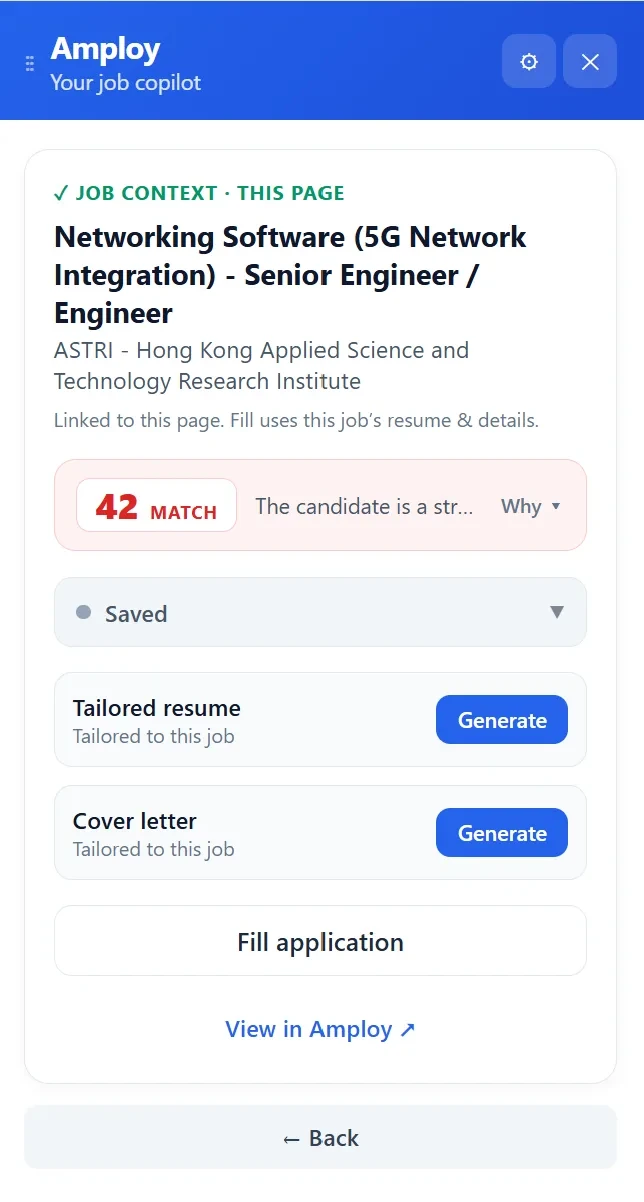
The point isn't to remove judgment from the process. It's to remove the retyping. You still decide what's relevant, what to emphasize, and what to cut. Amploy handles the mechanical part of reworking the same experience into a role-specific version so a tailoring pass takes minutes instead of an afternoon.
Keep every version tied to its application
A tailored resume is only useful if you know which job it belongs to. Amploy's job tracker keeps each tailored resume and cover letter next to its application, moving through a simple pipeline — Saved → Applied → Interview → Offer. So when a recruiter replies three weeks later, you can pull up the exact resume they're looking at.

Two small habits that make the whole thing stick
Save your logins. Applying at volume means bouncing between a dozen career portals, each with its own account. A password saver stores your logins per career site so you're not resetting a password mid-application (or abandoning one altogether).

Fill the form in one click. Once the resume is tailored, the application form itself is pure repetition — name, phone, work history, the same essay prompts. Autofill pulls from your profile so you can submit and move to the next role.

The takeaway
Tailoring your resume to each job is a five-step loop: read the posting for signals, reorder around the overlap, mirror the language honestly, sharpen your summary, and keep each version tied to its application. Done by hand, that's a lot of retyping. Done with Amploy, it's a few minutes per role — which is what makes it possible to actually play the numbers game without burning out.
Start with the next job you were going to apply to anyway. Run the five steps once. Then let Amploy handle the repetitive parts on the one after that.