
Simplify Alternatives: What to Consider Before Switching
Searching for "simplify alternatives" usually means one of two things: you're evaluating Simplify as a job-search autofill tool, or you're hunting for something that does more than autofill. Either way, the real question isn't "which tool is better on paper" — it's "which tool actually gets me applying to more roles, faster, without turning my brain into mush."
Here's how to think through that decision before you switch anything.
Start with what you actually need
Most job-search tools cluster into a few jobs-to-be-done. Get honest about which ones matter to you before comparing feature tables:
- Autofill — one click to fill name, phone, work history, and free-text essays.
- Tailoring — rewriting your resume and drafting a cover letter per role, so each application matches the job description.
- Tracking — a status pipeline so you know what's saved, applied, interviewing, and offered.
- Credentials — remembering logins across the dozens of career sites you'll touch.
If you only need the first one, plenty of tools will do. If you're tired of juggling five tabs to do all four, you're really looking for a suite — and that narrows the field considerably.
The hidden cost of managing too many tools
Switching tools feels productive. It often isn't. Every tool you add is another tab, another login, another place your resume versions diverge.
The actual bottleneck in a job search isn't picking software — it's the volume of applications you can realistically send. Most roles attract hundreds of applicants, and the people who land interviews are usually the ones who applied more, not the ones with the slickest tool stack. A tool that adds friction (extra tabs, separate resume files, manual copy-paste between systems) is quietly capping how many roles you can hit.
So the test for any alternative is blunt: does it let you apply to more roles, faster, with fewer handoffs?
What to check before you switch
A few practical questions to run against any alternative:
- Does it tailor, or just fill? Autofill saves a minute. Resume rewriting and cover-letter drafting save the part that actually determines whether you get a callback — matching your real experience to the specific job description.
- Where do the tailored documents live? If your resume and cover letter for a given role are stored next to that role's status, you avoid the "which version did I send?" mess.
- Do you have to migrate your history? Trackers only work if you use them consistently; starting from scratch every time you switch resets your momentum.
- Is it one tool or three? A single interface for autofill, drafting, and tracking beats stitching together a browser extension, a separate resume builder, and a spreadsheet.
How Amploy fits into that decision
Amploy is built around a single premise: hiring is broken, volume wins, and the busywork is what stops you from playing the numbers game without burning out. Rather than being one piece of the puzzle, it covers the whole loop in one place:
- Autofill — one click to fill name, phone, work history, and essays from your profile.
- Resume rewrite — rewrites your real experience to match each job description.
- Cover letter — generates a first draft referencing the role and your real experience, editable for your voice.
- Job tracker — a status pipeline (Saved → Applied → Interview → Offer) sitting right next to each tailored resume and letter.
- Password saver — one saved login per career site, so you're not resetting passwords when you're mid-application.
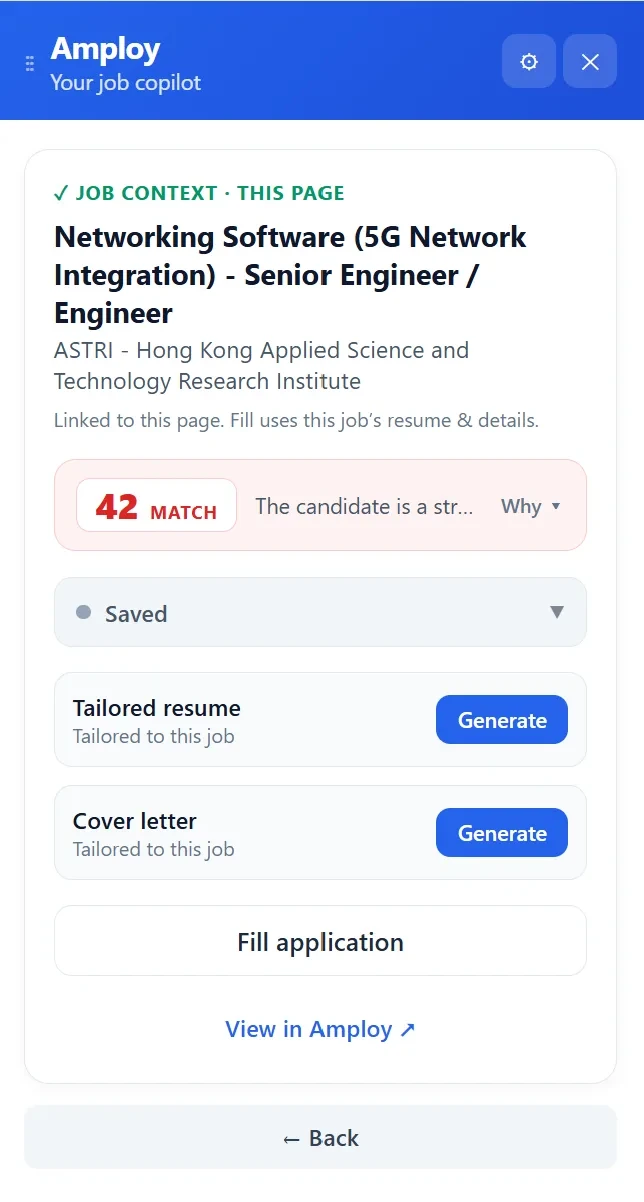
That consolidation is the point. If you're evaluating alternatives, the question to ask is whether they replace what you currently have, or just add another tab to it.
A quick way to test any alternative
Before committing, run the same role through your current tool and the alternative. Time how long it takes from "I want to apply" to "submitted," and count the manual steps in between. Then ask whether the tailored resume and letter ended up stored somewhere you'll actually find them later.

If the alternative isn't faster and doesn't keep your documents organized, the switch costs more than it saves.
The takeaway
The best "Simplify alternative" isn't necessarily the longest feature list — it's the one that removes the most handoffs between finding a job, tailoring for it, and tracking it. That's the whole reason Amploy exists: less busywork per application, more applications per week.
Ready to stop wasting so much time applying to jobs? Add Amploy to Chrome and see how much of your current workflow it replaces on the first application.