
Job Tracking That Goes Beyond a List of Companies
Most job searches start with a spreadsheet. A tab for companies, a column for the role, maybe a color-code for "heard back." It works for a week. Then applications pile up, versions of your resume multiply, and the spreadsheet becomes another thing to maintain instead of a tool that helps you move faster.
Job tracking is meant to answer a simple question: where does every application stand right now? A list of company names can't do that on its own. Here's what tracking looks like when it actually keeps up with a high-volume search.
A list of companies is not job tracking
A company name tells you almost nothing about the state of an application. You applied to the same company twice, six weeks apart — which resume did you send the second time? Did the first one get a reply? Was that role the one with the take-home?
A list also has no memory. It doesn't know that the tailored resume you sent to one team shares half its language with the cover letter you sent to another. It can't tell you that you've sent eleven applications this week and haven't heard back on any of them, or that the four roles you keep meaning to apply to have been sitting in "Saved" for nine days.
Real tracking keeps the application as the unit, not the company — and it keeps the materials attached to it.
What useful job tracking actually needs
Three things show up in every search that gets results:
Status that matches your real workflow. Saved, Applied, Interview, Offer. Anything more elaborate becomes a data-entry project. Anything less and you lose the thread between "I'm interested" and "I sent it."
The materials, attached. Every application should carry the resume and cover letter you actually sent — not the ones you have now. When a recruiter calls about a role from three weeks ago, you want to pull up the exact version, not reconstruct it from memory.
One home for it all. A tracker scattered across a spreadsheet, a notes app, and an inbox isn't a tracker. It's three places to check.

Why tracking and tailoring belong together
Here's the problem with tracking in isolation: a status pipeline tells you that you applied, but not what you applied with. And a high-volume search means every application is tailored — a resume rewritten to the job description, a cover letter drafted for that specific role. Multiply that across dozens of applications and the real question becomes: which version went where?
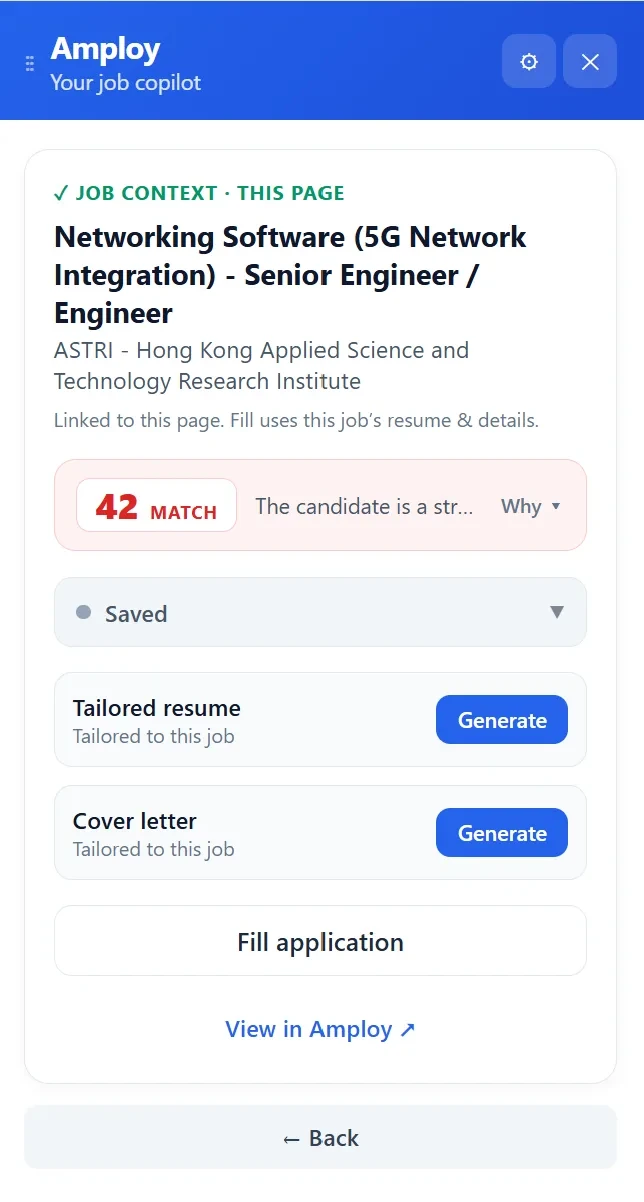
When tracking sits next to tailoring, that question disappears. In Amploy, every tailored resume and cover letter lives beside its application in the pipeline. You're not maintaining two systems — one for the documents and one for the status — and hoping they stay in sync.
Tracking is step one of the numbers game
The core premise behind Amploy is simple: hiring is broken, and volume wins. Rejections usually aren't personal — the people who land interviews are the ones who apply more, faster. But volume only works if you can keep up with it. Applying to thirty roles in a week is pointless if you can't tell which fifteen you've actually sent, or which tailored resume went to which company.
That's why the job tracker isn't a separate product bolted onto a job board. It's the record of a workflow that starts the moment you find a role:
- Find a job and generate a resume rewritten to match the description, plus a first-draft cover letter built from your real experience — editable, so it sounds like you.
- Apply with autofill handling the repetitive form fields in one click.
- Track it — the tailored materials and the status land in your pipeline together, from Saved through Offer.
- Come back to it whenever you need to check where things stand, or pull up what you sent.
No spreadsheet to update by hand. No guessing which version you submitted. And no losing track of a site's login either — saved passwords mean you're not resetting one more time just to check a status.

The test of a tracker: does it save you time?
A tracker is supposed to reduce the work of a job search, not add to it. If maintaining your tracking system takes longer than applying, something's wrong.
The right setup is the one that updates itself as you go — because it's built into the same tool you apply with. Every application you send through Amploy is already logged, already carrying its tailored materials, already sitting in a pipeline you can scan in seconds.
Your tracker should be the thing that lets you keep applying, not the thing that slows you down. Put it in the same place you tailor and apply, and the numbers game starts working in your favor.