
Job Tracking Spreadsheet: How to Build One That Survives a Long Search
A job search that runs for weeks or months isn't won by enthusiasm. It's won by memory. When you're applying to dozens of roles, details blur together: which version of your resume went to which company, whether you followed up, whether that recruiter ever replied. A job tracking spreadsheet is the simplest fix — a single place that holds every application so nothing slips.
The catch is that most tracking spreadsheets collapse under their own weight. They're built for the first week of searching, then abandoned by week six. Here's how to build one that actually lasts, and where the spreadsheet ends and a dedicated tracker begins.
Start with the columns that earn their place
Every column you add is a column you have to keep updated. That's the whole trade-off. A tracking spreadsheet works only if updating it takes seconds, not minutes.
Start with these:
- Company and Role title
- Date applied
- Status — Saved, Applied, Interview, Offer, Rejected
- Job posting link
- Resume version used
- Follow-up date
That's enough to run a real search. Everything else — salary notes, contact names, interview prep links — can live in extra columns later, but only if you find yourself wishing a column existed. Don't build for a version of your search that hasn't happened yet.
The status column is the whole system
The single most useful thing a tracking spreadsheet does is show you where each application stands. Without it, you're relying on inbox archaeology and half-remembered phone screens.
Keep statuses fixed and few. Saved → Applied → Interview → Offer, with Rejected as the terminal state. Five states are easy to scan; twenty invite inconsistency, because you'll forget whether "Phone screen" and "First round" were different things.
Version your resume inside the sheet
Here's the failure mode that bites long searches hardest: you tailor your resume for each role, then can't remember what you sent where. A week before an interview, you're guessing which bullet points the interviewer actually saw.
Solve it with one column — Resume version used — plus a simple naming habit: CompanyName-role.docx. If you keep tailored versions in a folder and log the filename in the sheet, you can pull the exact document back up in seconds.
This is where tailoring gets expensive, though. Writing a bespoke resume for every application is the behavior that makes spreadsheets feel like a burden, because you're spending twenty minutes per row. Amploy's resume rewrite takes your real experience and rewrites it against each job description, so the version you log is one you can generate rather than hand-craft.
Keep follow-ups off your calendar
Follow-up dates belong in the spreadsheet, not scattered across calendar reminders. Pick a rule and stick to it — for example, one week after applying with no reply, log a follow-up date. When you sit down to apply in batches, you check the follow-up column first, then send.
This is the habit that separates a search that works from one that fizzles. Most people apply and wait. The spreadsheet lets you apply and return.
Where tracking spreadsheets break
Be honest about the failure points. There are three, and they're predictable.
1. The row gets skipped. You're moving fast, you close the tab, and the application never made it into the sheet. Now your tracker is wrong, and a wrong tracker is worse than none — you'll trust it.
2. The resume step is too slow to record. If every row requires a bespoke resume and a bespoke cover letter, the sheet becomes a record of what you meant to do.
3. The career site has its own login. And you can't remember it. Multiply that across every applicant tracking system and job board you've touched, and you have another unwritten column.
None of these are reasons to abandon spreadsheets. They're reasons to automate the parts that don't need your attention, so the spreadsheet stays a record rather than a workload.

From spreadsheet to pipeline
A job tracker built into Amploy replaces the sheet with a status pipeline — Saved → Applied → Interview → Offer — sitting next to each tailored resume and cover letter. The reason that matters isn't that it's prettier. It's that the tracking happens as a side effect of applying, not as a separate chore afterward. Filling a form auto-fills from your profile, generates a resume against the job description, and the application is logged where you can see it.
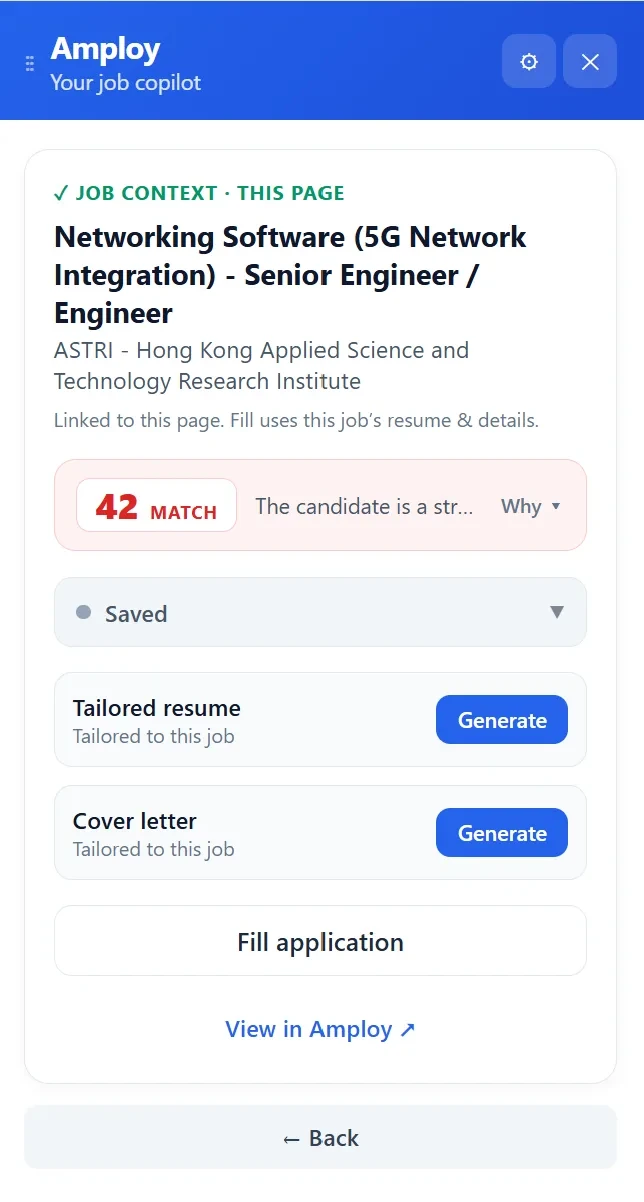
If you've ever lost a login to an application portal mid-application, that's covered too — Amploy stores site logins, one per career site, so you're not resetting a password to check whether an application went through.
What to do this week
If you already have a spreadsheet that's gone stale, you don't need to rebuild it. Do this instead:
- Keep the seven columns above. Delete everything else.
- Fix your statuses at Saved, Applied, Interview, Offer, Rejected.
- Log the resume version for every application, starting now.
- Batch your follow-ups — one pass a week, driven by the follow-up column.
- Move the tracking to where the applying happens, so no row gets skipped.
The whole point of a tracking spreadsheet is to make the numbers game survivable. Volume wins in a broken hiring market, but only if you can feel the momentum of your own search. A tracker that takes a second to update gives you that. A tracker that takes an evening doesn't.

You don't apply to more jobs by working harder at the same number of applications. You apply to more by making each one cheaper to start, easier to tailor, and impossible to lose track of. That's what the spreadsheet is trying to do — Amploy just removes the parts that made you stop opening it.