
Job Tracking App vs. Spreadsheet: Which Keeps Your Search Organized?
You're applying to more jobs than ever. Somewhere between the fifteenth and fortieth application, the wheels come off — you can't remember which version of your resume went to which company, or whether you ever followed up with that recruiter. The fix isn't more willpower. It's choosing the right system for keeping track.
What a spreadsheet actually gets right
Let's be fair to the humble spreadsheet. It's free, it's familiar, and five minutes after deciding to get organized you can have a working tracker:
- Company, role, date applied, status
- A link to the job posting
- A column for interview dates or follow-ups
For someone applying to three or four roles a week, a spreadsheet is genuinely fine. It's flexible, you own the data, and nobody's charging you a subscription. If your job search is small and slow-paced, stop reading and go make that sheet.
Where spreadsheets quietly fall apart
The problem is that job searching at volume is a different sport. The moment you start tailoring resumes and cover letters per application — and you should — a spreadsheet becomes a filing cabinet with no folders.
Version chaos. You apply to a role with a resume rewritten for that specific job description. A week later, you can't find which version you sent, or it's saved as resume_final_v3(2).docx somewhere in your downloads. The tracking row says "Applied" but nothing connects it to the actual documents.
Manual everything. Logging a new application means opening the sheet, scrolling to the bottom, typing the company, role, URL, date... and doing it again tomorrow. Every field is a small act of copy-paste from the job posting.
Status drift. Did you hear back from that fintech company, or was that the logistics one? Spreadsheets don't nudge you. Follow-ups depend entirely on you remembering to check.
No passwords. Half the value of a tracker is getting back into a career site quickly — and a spreadsheet can't remember your login for the tenth employer portal you've signed up to this month.
What a dedicated job tracking app does differently
A job tracking app is built specifically for the application pipeline. Instead of a flat grid of rows, you get a status view — typically something like Saved → Applied → Interview → Offer — with each job's materials attached in place.
The difference in practice:
- Statuses are first-class. Change a stage with a click, and see at a glance how many applications are still waiting for a response.
- Documents live with the job. The tailored resume and cover letter you sent are stored next to that specific role, so you never wonder which version went where.
- Less manual entry. A purpose-built tracker can be filled in as you apply rather than reconstructed afterwards.

The real dividing line: does the tracker connect to the applying?
Here's the honest test. A tracking app only beats a spreadsheet if it saves you time at the front of the pipeline — the tedious part of filling in applications and tailoring documents — not just at the back.
That's the gap Amploy was built to close. It's a job-search productivity tool that works as a Chrome extension plus a website, and the tracking is part of the same flow as the applying:
- Autofill drops your name, phone, work history, and saved answers into application forms in one click.
- Resume rewrite takes your real experience and rewrites it to match each job description.
- Cover letter generates a first draft that references the role and your actual background, which you then edit for your voice.
- Job tracker keeps a status pipeline next to each tailored resume and letter, so the documents and the stage live together.
- Password saver stores one login per career site, so returning to an employer's portal isn't a password-reset detour.
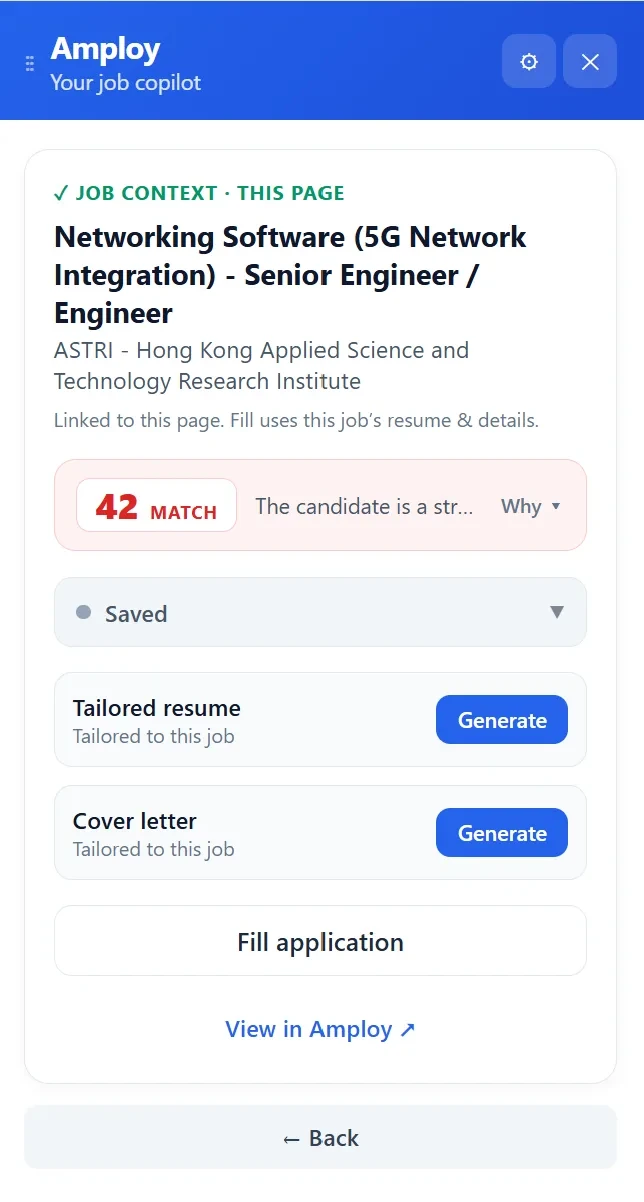
The payoff is that tracking stops being a separate chore. When the resume tailoring and form-filling happen in the same place as the application, the tracker fills itself as you go — and it stays accurate because there was never an extra step to skip.

So which should you use?
It depends on your volume, and it's worth being honest with yourself:
- Low volume, casual pace (a few applications a week): a spreadsheet is enough. Keep it simple.
- High volume, tailored applications (dozens a month): a spreadsheet will cost you more time than it saves. You need documents and statuses stored together, without manual re-entry — which is the case for a dedicated tracker built into your application workflow.
Most people start with a spreadsheet, hit the version-chaos wall around application number twenty, and then look for something better. If that's you, the move is to stop maintaining a tracker by hand and let the applying and the tracking happen in one place.
Install Amploy in Chrome, and the next application you fill out also gets logged — resume, cover letter, and status included. Play the numbers game without the spreadsheet upkeep.