
Job Application Tracker: What to Track and Why It Matters
Applying to jobs feels productive. You tweak a resume, fill out a form, hit submit, and move on to the next tab. A week later, you get an email and can't remember which role it's about, what you sent, or whether you already applied to that company's other posting.
That's the quiet tax of a high-volume job search: not the applications themselves, but the memory overhead. A job application tracker fixes that. Here's what's worth tracking, why it changes outcomes, and how to keep the tracking from becoming its own part-time job.
Why tracking matters more than it seems
The core problem with job hunting isn't that you're bad at it. Hiring is broken and volume wins — most roles get hundreds of applicants, and the people who land interviews are usually the ones who applied more, faster. Rejections aren't personal.
But volume only works if you can keep your bearings. When you're sending out dozens of applications, three things break down without a tracker:
- You lose context. Which version of your resume went to which role? What did you say in that cover letter?
- You miss follow-ups. A recruiter replies, and it's buried three inbox pages down.
- You burn out. Re-opening the same application to check its status is exactly the kind of busywork that makes people quit a search early.
A tracker turns a chaotic spray of applications into a pipeline you can actually read.
What to track (and what to skip)
You don't need a sprawling spreadsheet. You need just enough fields to answer "what's happening with this?" at a glance.
The essentials
- Company and role title — enough to identify the posting even when the email subject is vague.
- Date applied — your anchor for follow-ups and for spotting stale applications.
- Status — the stage it's in. Keep the stages simple: Saved → Applied → Interview → Offer.
- The materials you sent — the specific resume and cover letter version tied to that role.
- Source — where you found it, so you know which job boards actually pay off.
Nice to have
- Contact or recruiter name, if you have one.
- Link to the original posting, so you can re-read the description before an interview.
- Notes — a quick line on why you want the role or what to prepare.
That's it. If a field doesn't help you take the next action, it's clutter.
The trap: tracking in too many places
Most people piece together a tracker from whatever's nearby — a spreadsheet, a notes app, a folder of resume files, and a browser history full of application pages. The tracking works, technically, but it lives in five places at once, and updating it becomes a chore you skip.
The fix is to keep the tracking next to the applying. In Amploy, every role you work on sits in a status pipeline, and each tailored resume and cover letter stays attached to the job it was written for.

That adjacency matters. When the resume, the cover letter, and the status all live together, you never have to reconcile three separate systems to figure out where a role stands.
Tailoring at volume is the other half of the problem
Tracking alone won't get you interviews. The applications you track still need to be specific enough to get read — and that's where most people slow to a crawl. Rewriting a resume for every job description and drafting a fresh cover letter each time is the exact repetitive work that caps how many roles you can realistically apply to.
This is where Amploy earns its keep. It will:
- Rewrite your resume to match each job description, using your real experience.
- Generate a first-draft cover letter that references the role and your background, editable for your voice.
- Autofill application forms — name, phone, work history, essays — from your profile in one click.
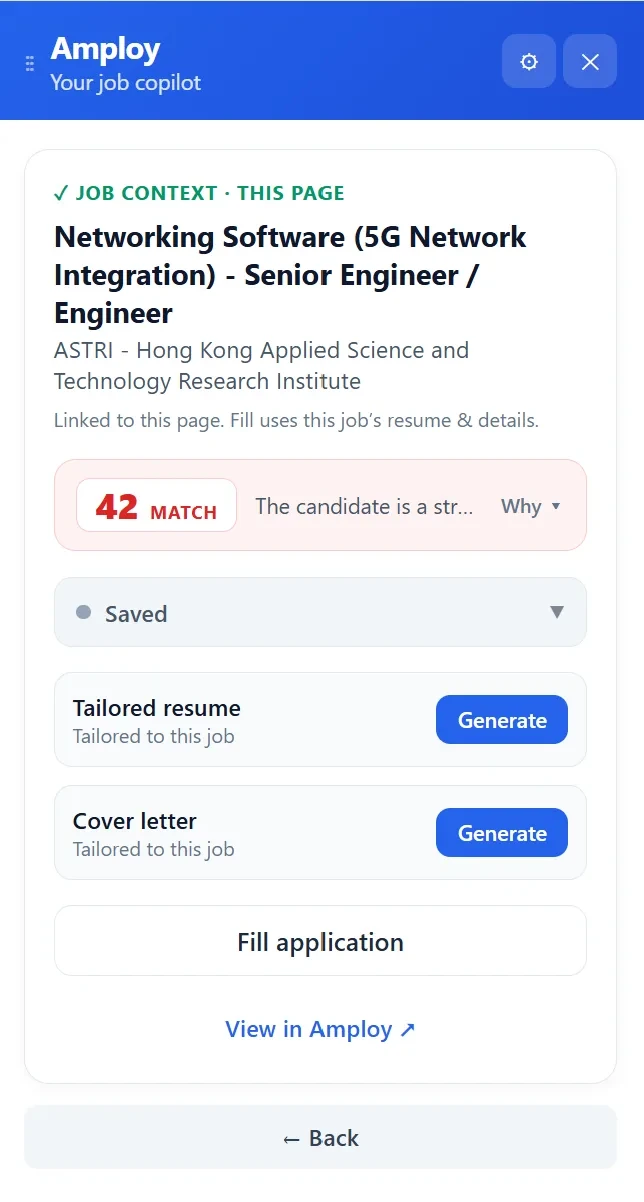
Every one of those outputs lands next to the role in your tracker, so the pipeline stays current without you manually filing anything. You can play the numbers game without burning out.
A simple rhythm that keeps the tracker honest
Tracking fails when it's a separate ritual. Build it into the loop you're already in:
- Save the role when you find it — before you decide whether to apply.
- Tailor your resume and letter for that specific posting.
- Apply, and let the form fill itself so you're not retyping the same work history for the fiftieth time.
- Update the status the moment something changes — a reply, an interview invite, an offer.
- Review the pipeline weekly. Anything sitting in "Applied" with no movement tells you where to follow up or where to adjust your approach.
One more piece worth handing off: the logins. Career sites each want their own account, and forgetting a password mid-application is its own small defeat. Amploy's password saver keeps one saved login per career site, so you're not resetting credentials every time you return to a portal.

Start with the pipeline, not the spreadsheet
You don't need a perfect tracking system. You need one place where every role, its status, and the materials you sent live together — and you need the applying itself to take less time than the tracking.
That's the whole point of Amploy: a job tracker built into the same tool that writes your resume, drafts your cover letter, and fills your applications. Install the extension, save your first role, and let the pipeline do the remembering so you can focus on volume.