
Job Application Tracker: the Free Spreadsheet (And When to Ditch It)
Applying to jobs at volume creates a paperwork problem fast. Twenty applications in, you're juggling confirmation emails, half-remembered login details, and a nagging feeling you've already applied to that company twice.
A spreadsheet is the classic fix. It's free, it's flexible, and almost everyone starts there. It's also worth knowing when it stops helping and starts costing you time. Here's a practical look at both sides.
Why the free spreadsheet works
The appeal is simple: zero cost, total control. A basic job application tracker gives you a single place to answer the questions that actually matter during a search.
- What have I applied to? One row per role, with company, title, and date.
- Where is each one? A status column — Saved, Applied, Interview, Offer — shows your pipeline at a glance.
- What did I send? Notes on which resume or cover letter version went out.
- What's next? Follow-up dates, recruiter names, and interview times.
You can build this in ten minutes, and it scales from five applications to fifty without much friction. If you're applying to a handful of roles, it's genuinely hard to beat.
Where the spreadsheet starts to break
The cracks show up when volume increases. Hiring is competitive — most roles draw hundreds of applicants — so landing interviews usually means applying more, and faster. That's exactly when a manual tracker gets painful.
You're the one doing all the copying. Every row is typed by hand: the company, the role, the link, the date. Multiply that by dozens of applications and the tracker itself becomes a chore.
Logins get lost. Careers pages, applicant portals, and job boards all want accounts. Forgetting which password you used on which site is a small problem that shows up at the worst time.
The tracker and your documents live apart. Your spreadsheet says you applied. It doesn't tell you which tailored resume you sent, or whether the cover letter referenced the right role. You end up cross-referencing files and folders.
Statuses drift out of date. A spreadsheet only works if you update it. After a busy week of applications, catching up on rows is its own task — and an out-of-date tracker is worse than none.
Signs it's time to move on
There's no universal cutoff, but a few signals are reliable:
- You're applying to enough roles that manual data entry eats real time.
- You've forgotten a login and had to reset a password mid-application.
- You can't quickly tell which resume version went to which job.
- Updating the tracker feels like a job in itself.
- You're avoiding applying because the admin is exhausting.
If two or more of those sound familiar, the spreadsheet has done its job and you've outgrown it.
What a purpose-built tracker does differently
The point of a job application tracker isn't the table — it's everything around it. A tool built for job search connects the parts that a spreadsheet keeps separate.
With Amploy, the job tracker sits right next to each tailored resume and cover letter, so the status pipeline (Saved → Applied → Interview → Offer) is attached to the exact documents you sent. No more guessing which version went where.
The rest of the busywork is handled closer to the source:
- Autofill fills name, phone, work history, and essays from your profile in one click, so the repetitive form fields stop slowing you down.
- Cover letter generates a first draft that references the role and your real experience — then you edit it in your own voice.
- Resume rewrite matches your actual experience to each job description.
- Password saver keeps site logins on hand, so a forgotten password never blocks an application.
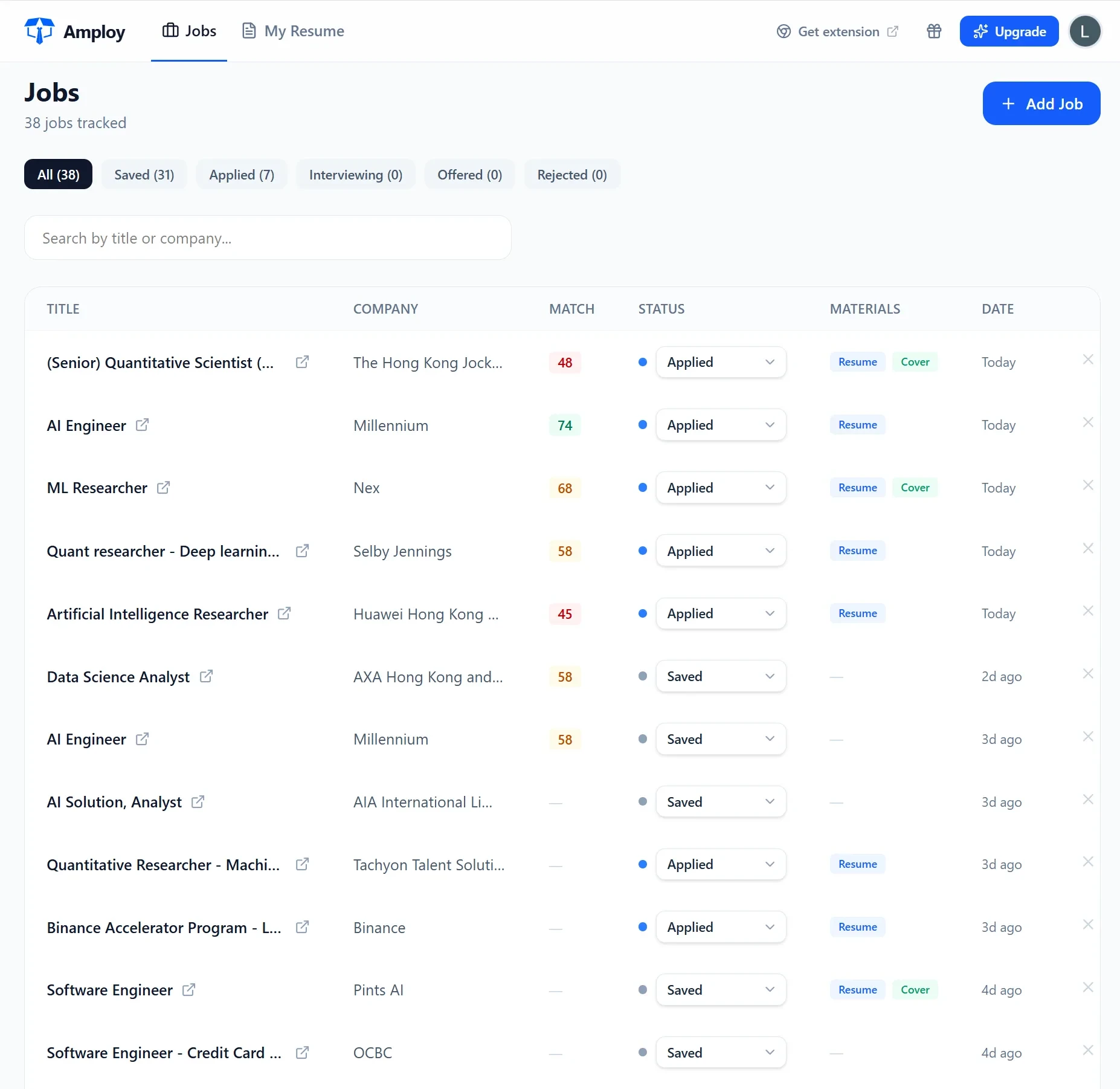
The difference in practice: instead of applying in one place and logging it in another, the application and the record of it happen together.
Spreadsheet or tracker — how to decide
Use the spreadsheet if you're applying to a small number of roles, you like full control over your own system, and data entry isn't a burden yet.
Switch when the admin is the bottleneck. If the time you spend tracking applications is time you could spend sending more of them, a tool that automates the repetitive parts is the better trade. Amploy's whole promise is exactly that: stop wasting so much time applying to jobs. The tracker is free of the manual upkeep a spreadsheet demands, because the details are captured as you go.
The takeaway
Start with a spreadsheet if it fits. Keep it lean, update it honestly, and watch for the signs that it's become work in itself. When it does, move to a tracker that connects your applications, documents, and statuses in one place — and get back to playing the numbers game without burning out.