
Job Application Tracker Excel vs. a Dedicated App: An Honest Comparison
You've probably already got a spreadsheet open somewhere with tabs for job boards, a running list of applications, and maybe a color code you half-remember. A job application tracker in Excel feels like the pragmatic choice: free, familiar, infinitely customizable. And for a certain kind of job seeker, it genuinely works.
But "works" is doing a lot of heavy lifting in that sentence. The honest comparison isn't Excel versus nothing — it's Excel versus a dedicated tool built for exactly one job. Let's look at where a spreadsheet earns its keep, where it quietly costs you time, and how to decide which camp you're in.
Why people reach for Excel in the first place
There's a reason the job application tracker Excel template is so popular. A spreadsheet is:
- Free. No subscription, no signup.
- Yours. You control the columns, the formatting, the formulas. Want to rank applications by excitement? Add a column.
- Familiar. If you've used Excel for anything, you already know how it works.
When you're applying to a handful of roles and juggling a few conversations, a spreadsheet is genuinely enough. There's no shame in it. Volume is low, tracking overhead is low, and the friction doesn't bite yet.
Where the spreadsheet starts to strain
The problem is that a spreadsheet tracks outcomes. It records what already happened — you applied, you got a reply, you moved to the next round. It doesn't help you do the thing that produces those outcomes: applying, tailored, at volume.
Here's where Excel quietly becomes a tax:
It's a second job. You finish an application, then open the spreadsheet, then find the row, then type the company, the role, the date, the link, the status. Multiply that by every application and the admin starts rivaling the applying.
Tailoring lives outside the sheet. Most applications benefit from a resume tuned to the job description and a cover letter that doesn't sound like a template. Your spreadsheet can't generate either. So you zip between Word, the job posting, and your tracker — three windows, one workflow, zero integration.
Status drifts. A cell is only accurate if you remember to update it. One busy week and your "Applied" column is stale, you've lost track of which follow-up is due, and a promising conversation slips through.
It doesn't scale with volume. The whole premise of a numbers game is that more applications, done well, mean more interviews. A spreadsheet is fine at ten applications. At forty, the manual upkeep becomes the bottleneck — and you either slow down or the tracker falls apart.
What a dedicated tracker does differently
A dedicated app isn't just a prettier spreadsheet. The difference is that tracking sits inside the workflow instead of beside it.
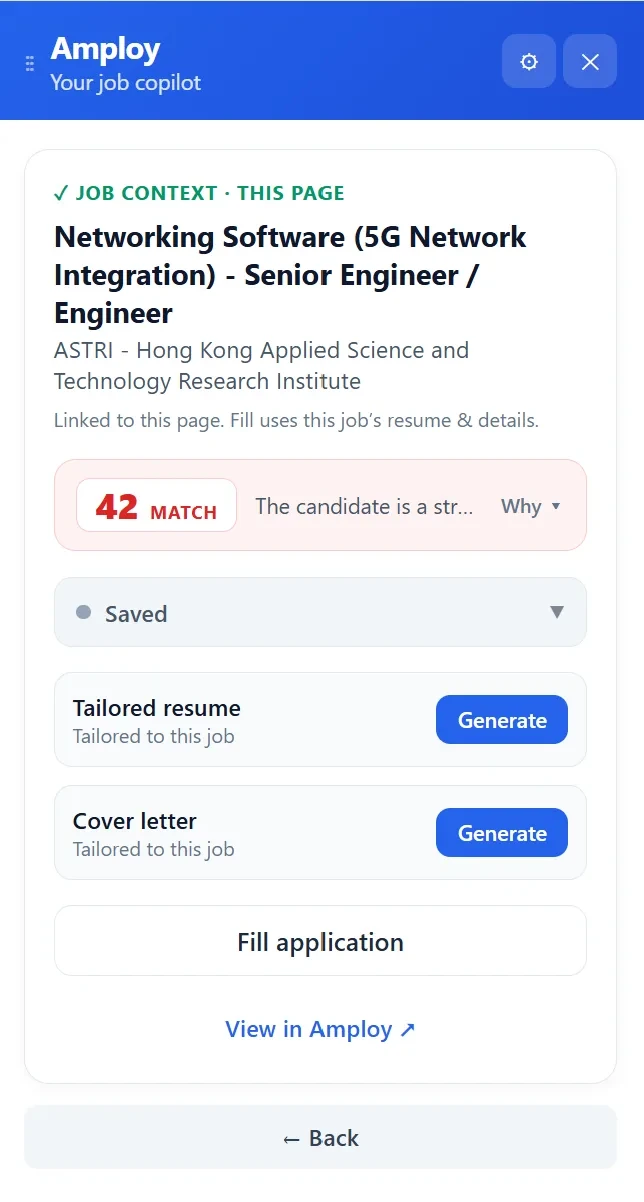
Take Amploy. Its job tracker runs as a status pipeline — Saved → Applied → Interview → Offer — sitting right next to each tailored resume and cover letter. You're not switching to a separate tool to log an application, because the application and the tracking happen in the same place.
That matters for a few practical reasons:
- The record writes itself. When you apply, the status and the associated materials are already there. No "remember to update the sheet later" step.
- It's connected to the actual work. Amploy generates a first-draft cover letter referencing the role and your real experience, rewrites your resume to match each job description, and autofills application forms from your profile. The tracker keeps the output of that work organized.
- It remembers the boring stuff. A password saver keeps site logins per career site, so you're not resetting a password on the fourth job board of the day.

The point isn't that a pipeline view is fancier than a spreadsheet. It's that when tailoring, applying, and tracking live in one place, the volume approach becomes sustainable instead of exhausting.
The honest trade-offs
A dedicated tool isn't free of downsides, and it's worth saying so.
Customization. Excel lets you build any column you want. A dedicated tracker gives you structure — a defined pipeline and the tools that feed it. If you love bespoke columns and pivot tables, you'll feel constrained.
Cost and setup. A spreadsheet costs nothing and takes a minute. A tool asks for a signup and a profile. The setup is front-loaded, and you only get the payoff if you're applying at enough volume to benefit.
Data lock-in. Your spreadsheet is a file you own. With any app, it's worth thinking about how your history is stored and whether you can get it out. (This is a fair question to ask of any tool you adopt.)
None of these are dealbreakers — but they're the honest reasons someone might reasonably stick with Excel.
Which one should you actually use?
Let the volume decide.
Stick with Excel if: you're applying to a small, targeted handful of roles, you enjoy the manual control, and tracking admin isn't costing you applications. A well-built spreadsheet is a perfectly good tool.
Move to a dedicated tracker if: any of these sound familiar —
- You're applying to many roles and the tracker has become a chore.
- You're tailoring resumes and cover letters by hand, job by job, and it's eating your evenings.
- You've lost track of a status, a follow-up, or a login.
- You want to play the numbers game without burning out.
If you recognize yourself in the second list, the fix is to remove the busywork — not to build a better spreadsheet. That's precisely what Amploy is for: autofill the forms, draft the letter, tailor the resume, and track it all in one pipeline so you can apply to more roles, faster.
Making the switch without losing your history
You don't have to throw your spreadsheet away. A practical approach:
- Keep your existing sheet as an archive. It's a useful record of past applications.
- Start new applications in a dedicated tracker so the status and materials stay linked from day one.
- Set a volume threshold for yourself. If you're consistently applying to more than a handful of roles a week, the manual upkeep is probably costing more than it's saving.
- Let the tool do the repetitive parts. Autofill, tailored drafts, and a live pipeline are there to buy back the time you'd otherwise spend on admin.
The best tracker is the one that keeps up with your actual applying pace — and doesn't become a second job of its own.