
How to Autofill Job Applications (And Stop Retyping the Same Fields)
Job hunting has a hidden tax: the retyping. Your name, your phone number, your work history, the dates, the same list of responsibilities — entered again and again, on site after site, form after form.
It doesn't feel like much on a single application. But multiply it across every role you apply to and it adds up to hours you could have spent applying to more jobs.
This is exactly the busywork Amploy is built to remove. Its core promise is simple: stop wasting so much time applying to jobs. Here's how to actually do that.
Why retyping is the wrong thing to spend your time on
Hiring is broken, and volume wins. Most roles get hundreds of applicants. Rejections usually aren't personal — the people who land interviews tend to be the ones who apply more, and faster.
That means your real edge isn't typing speed. It's throughput. Every minute spent re-entering the same information is a minute not spent getting your application in front of another hiring manager.
The goal isn't to work harder on each application. It's to play the numbers game without burning out.
The repetitive parts you can stop doing by hand
Most of what eats up your application time is genuinely repetitive:
- Typing name, phone, and contact details into every form
- Re-entering your work history and dates
- Rewriting the same essay answers from scratch
- Pasting in a cover letter that barely changed
- Manually tweaking your resume for each job description
- Keeping track of which application went where
None of this is the part of a job search that actually gets you hired. It's overhead.
How autofill changes the workflow
Amploy is a Chrome extension plus a website built for job search. The centerpiece is one-click autofill: it fills your name, phone, work history, and essays straight from your profile.
So instead of retyping the same fields, you fill out a form in seconds and move on to the next role.
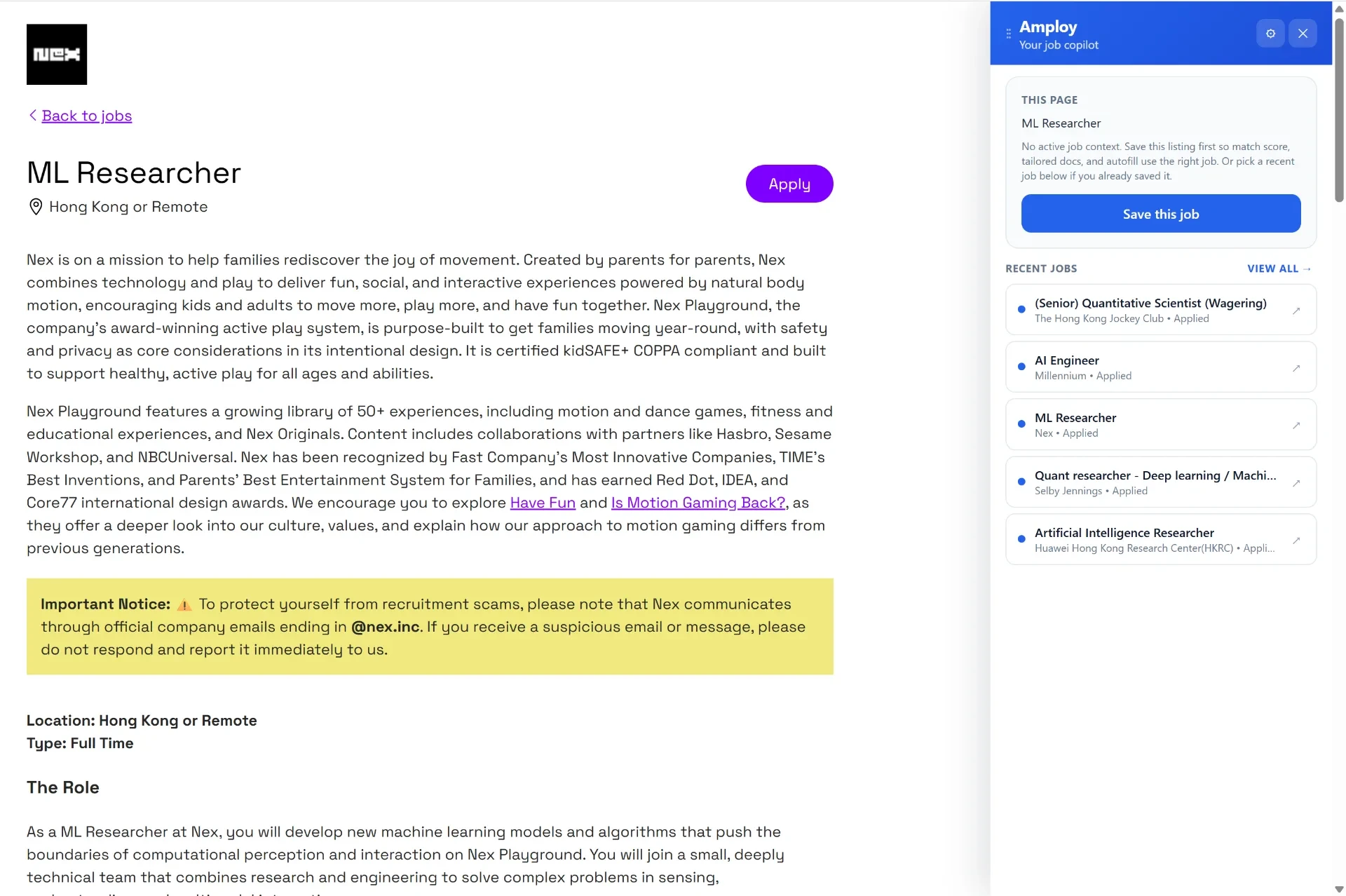
Once your profile is set up, the repetitive data entry is handled for you — across every application where you use the extension.
Beyond the form: the parts that make tailoring fast
Autofill handles the data entry. But tailoring each application is the other time sink — and it's the part that actually makes your application competitive.
Here's how Amploy handles it:
- Cover letters — generates a first draft that references the specific role and your real experience. You can edit it to sound like you.
- Resume rewrite — rewrites your real experience to match each job description.
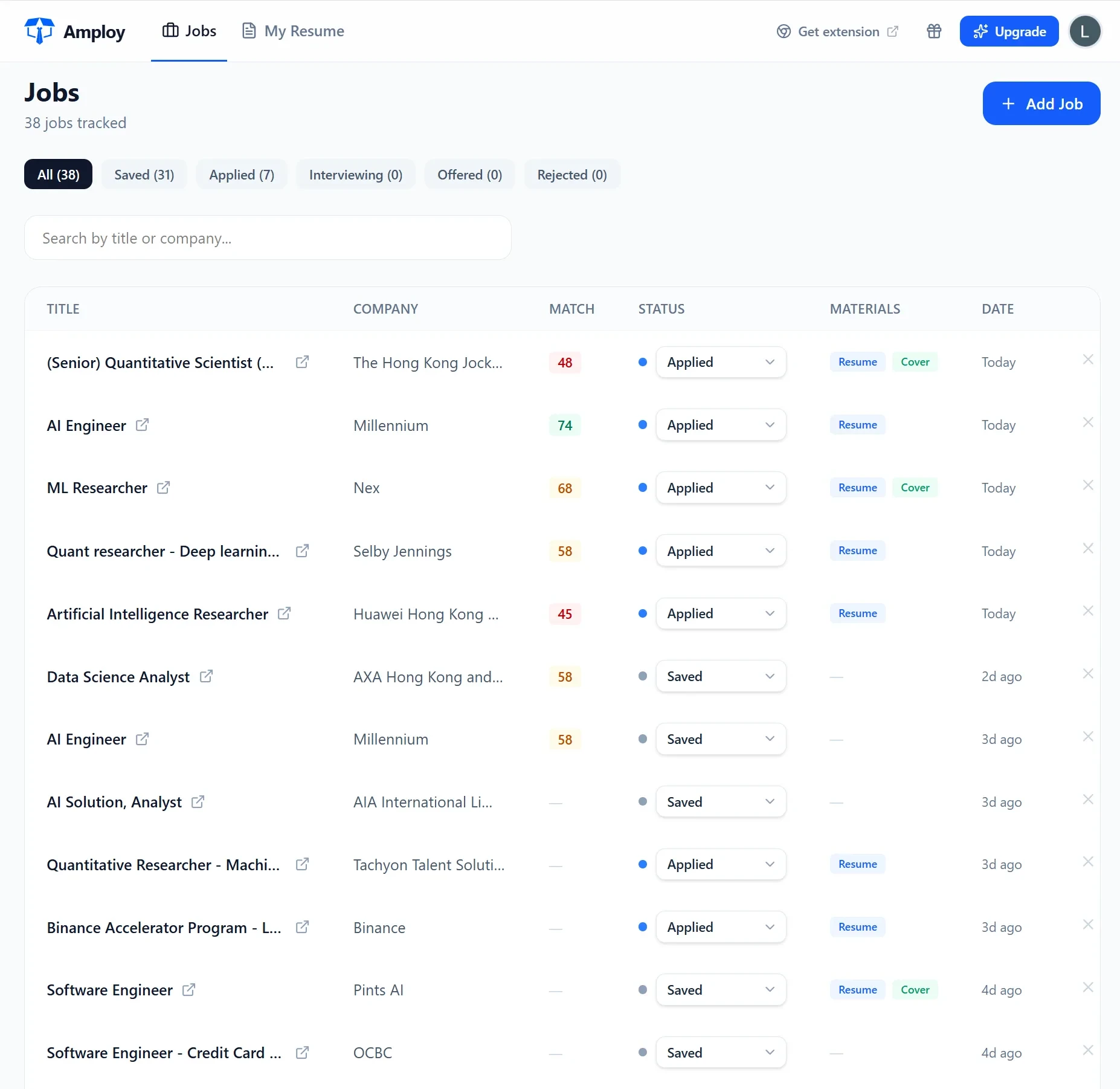
- Job tracker — a status pipeline (Saved → Applied → Interview → Offer) sitting next to each tailored resume and letter, so nothing gets lost.
- Password saver — stores site logins so you never get locked out of an application portal again.

Because your tailored resume and cover letter live right next to the application in the tracker, you're not juggling files, notes, and a separate spreadsheet. The whole workflow stays in one place.
A repeatable application routine
If you want a process you can actually keep up with, it looks something like this:
- Build your profile once. Your work history, contact details, and standard essay answers.
- Autofill the form. One click instead of one retype.
- Generate a first draft of your cover letter and resume, then edit for your voice and the specific role.
- Log it in the tracker so you know exactly what stage every application is in.
- Move to the next role — and don't lose momentum to data entry.
The point isn't to skip care on each application. It's to remove everything that isn't care — the retyping, the reformatting, the copy-pasting — so the only thing left to do is the work that matters.
The bottom line
You can't control how many other people apply to a role. You can control how many roles you get through, and how quickly.
Autofill won't write your story for you — the cover letter and resume still get tailored and edited. But it will stop you from spending your job search typing the same fifteen fields into a hundred different boxes.
Stop wasting so much time applying to jobs. Fill the form once, apply to more, and let the numbers work in your favor.